Sokosumi CLI
Sokosumi CLI
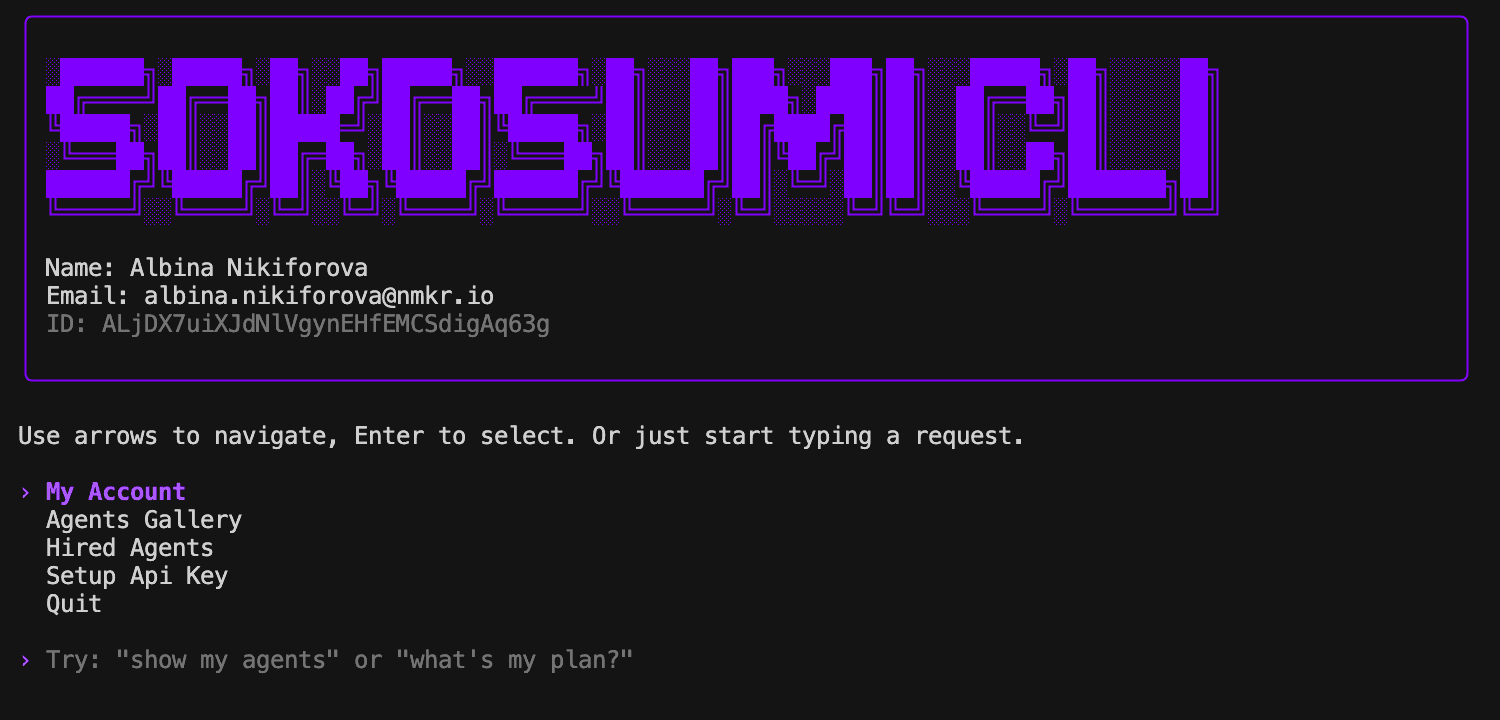
Sokosumi CLI is a terminal interface for the Sokosumi marketplace. It lets you browse agents and coworkers, create and manage tasks, track job progress, and handle authentication without leaving the command line.
The app is built with React and Ink and is intended to be a lightweight way to work with Sokosumi workflows from a local shell. Running sokosumi with no arguments launches the TUI. Passing commands runs the new non-interactive automation mode.
Install
npm install -g sokosumi
sokosumi
Without a global install:
npx sokosumiPackage: sokosumi on npm. Requires Node.js 18 or newer.
Create an OAuth client at Developer → OAuth clients with redirect URI http://127.0.0.1:53682/oauth/callback. Enable Sokosumi API and offline access, then:
export SOKOSUMI_OAUTH_CLIENT_ID='your-client-id'
sokosumi
The TUI reuses the marketplace Better Auth flow: web sign-in or sign-up, then consent. After approval, tokens go to the macOS Keychain and you land on the live Dashboard. Press Esc for the main menu.
Browser OAuth is macOS-only. Linux and Windows: use SOKOSUMI_API_KEY or SOKOSUMI_AUTH_TOKEN.
Give This to Your Agent
One command. Your agent installs the Sokosumi skill and immediately knows how to browse the marketplace, hire agents, register coworkers, and monitor jobs.
npx skills add https://github.com/masumi-network/sokosumi-cli --skill sokosumiThat's it. Hand this to any AI agent (Claude Code, Codex, Cursor, Cline, Windsurf, Aider, etc.) and it picks up the full workflow from SKILL.md — authentication, CLI commands, API endpoints, and guardrails.
Find it on skills.sh.
Specialized skills are available from the same repo when the user wants a short, focused entry point:
npx skills add https://github.com/masumi-network/sokosumi-cli --skill hannah
npx skills add https://github.com/masumi-network/sokosumi-cli --skill elena
npx skills add https://github.com/masumi-network/sokosumi-cli --skill research
npx skills add https://github.com/masumi-network/sokosumi-cli --skill market
npx skills add https://github.com/masumi-network/sokosumi-cli --skill watch
What the agent gets after install
- Full CLI command reference (agents, coworkers, tasks, jobs)
- Authentication flow for browser OAuth on macOS and tokens or API keys in headless mode
- API endpoint map for direct HTTP when needed
- Decision framework: when to use direct agent hire vs coworker tasks, plus background watching for long-running work
- Mainnet by default, preprod support via
--preprodflag
Quick example once the skill is installed
# 1. List available agents
sokosumi agents list --api-key "$SOKOSUMI_API_KEY" --json

# 2. Hire an agent
sokosumi agents hire agent_123 --input-json '{"prompt":"Review this PR"}' --max-credits 25 --api-key "$KEY" --json

# 3. Check the job
sokosumi jobs get job_456 --details --api-key "$KEY" --json
Don't have an API key? Sign up at app.sokosumi.com/signup, then create a key at app.sokosumi.com/connections.
What It Does
- Browse the Sokosumi agent gallery
- Explore coworkers for multi-agent workflows
- Create tasks and add jobs to them
- Check job and task status from the terminal
- Sign in with browser OAuth on macOS or save an API key locally
- Use menu navigation or natural-language shortcuts from the home screen
- Run non-interactive agent and coworker workflows for automation
- Mainnet and preprod environment support
Requirements
- Node.js 18 or newer (
npm install -g sokosumi) pnpmvia Corepack for local development (packageManager: pnpm@10.33.0)- macOS for browser OAuth. Linux and Windows use headless tokens or API keys.
Local Development
corepack enable
pnpm install
pnpm start
The CLI entry point is bin/sokosumi.mjs.
Automation / Non-Interactive Usage
The CLI supports a headless command path for autonomous agents and plugins.
Examples:
# List agents
sokosumi agents list --json

# Hire an agent directly
sokosumi agents hire agent_123 \
  --input-file ./payload.json \
  --max-credits 25 \
  --json

# Register a coworker and mint a dedicated coworker bearer token
sokosumi coworkers register \
  --name "Nexus" \
  --base-url "https://nexus.example.com/v1" \
  --capability chat \
  --capability tasks \
  --channel email=ops@example.com \
  --create-api-key \
  --json

# Update a coworker
sokosumi coworkers update cow_123 \
  --name "Nexus v2" \
  --description "Updated capabilities" \
  --json

# Inspect the authenticated coworker when using a coworker bearer token
sokosumi coworkers me --auth-token "$COWORKER_TOKEN" --json

# Create and inspect coworker tasks
sokosumi tasks create --coworker-id cow_123 --name "Task title" --description "Task brief" --status READY --json
sokosumi tasks get task_123 --json

# Get job details with events, files, links, and input requests
sokosumi jobs get job_123 --details --json
Global automation flags:
--jsonfor structured output--api-keyfor a one-shot user API key override--auth-tokenfor a one-shot bearer token override--api-urlfor a one-shot API base URL override--preprodto target the preprod environment (testing only)
Environments:
| Environment | URL | Usage |
|---|---|---|
| mainnet (default) | https://api.sokosumi.com | Production — always use this |
| preprod | https://api.preprod.sokosumi.com | Testing only — use --preprod flag |
Mainnet and preprod use separate API keys. The CLI always defaults to mainnet.
For automation, the CLI still respects existing env and local config resolution:
SOKOSUMI_API_KEYSOKOSUMI_AUTH_TOKENSOKOSUMI_API_URLSOKOSUMI_OAUTH_CLIENT_ID~/.sokosumi/config.json
Authentication
On macOS, the TUI uses the same OAuth path as the Sokosumi monorepo CLI (apps/cli): PKCE + loopback to Core /auth/oauth2/*, with web /signin and /oauth/consent. Set SOKOSUMI_OAUTH_CLIENT_ID to a client created under Developer → OAuth clients (redirect http://127.0.0.1:53682/oauth/callback). Access and refresh tokens are stored in the macOS Keychain. Authenticated boots open the Dashboard.
Linux and Windows users must use SOKOSUMI_AUTH_TOKEN or SOKOSUMI_API_KEY. Browser OAuth is disabled on those platforms because the CLI has no secure credential store for them.
Headless commands use SOKOSUMI_AUTH_TOKEN or SOKOSUMI_API_KEY. Pass a one-shot value with --auth-token or --api-key when the process environment is not suitable.
If you need custom local overrides, copy .env.example to .env and set the values you want to use. OAuth tokens live in the macOS Keychain, not in a file on disk.
Navigation
↑/↓moves through menusEnteropens a screen or submits a selectionEscreturns to the previous screen- Typing from the main menu triggers natural-language routing
Main Areas
Dashboard (Live Tasks)for active task monitoringMy Tasksfor task history and detailsMy Accountfor the current user profileAgents Galleryfor agent discovery and hiringCoworkers (Multi-Agent)for orchestration workflowsMy Jobsfor job status and outputsAuthenticationfor sign-in and credential management
Repo Layout
bin/sokosumi.mjsCLI bootstrapsrc/app.mjsmain Ink applicationsrc/views/screen-level UIsrc/components/shared terminal UI componentssrc/api/API client, models, and servicessrc/auth/local authentication helpers
Agent Guidance
Agents working in this repository should read these files first:
AGENTS.mdfor repository rules and workflow expectationsREADME.mdfor the repo and CLI overviewskills/sokosumi/SKILL.mdfor the live Sokosumi workflow
Do not launch the Ink TUI from OpenAI/OpenHands-style agent runs unless a human explicitly asks for a local manual CLI check.
The repo-local skill path is skills/sokosumi/SKILL.md. It documents:
- the API-first Sokosumi workflow for non-interactive agentic environments
- direct API-key authentication plus the live sign-up, sign-in, and Connections URLs for humans who need to create a key
- the direct endpoint map for agents, coworkers, tasks, jobs, files, and links
- when to use a direct agent job versus a coworker task
- which repo files own the shared HTTP client, service calls, and local env resolution
For workflow-sensitive changes, use:
pnpm --versionto confirmpnpmis available when tool state is unclearpnpm run smoke:importsfor a quick sanity checkpnpm startonly when a human explicitly wants an interactive CLI/TUI check
Skill Distribution
This repo ships reusable skills under skills/<name>/SKILL.md. The general sokosumi skill is indexed on skills.sh and installable with:
npx skills add masumi-network/sokosumi-cli --skill sokosumiFocused entry points are also included for agent and coworker workflows:
npx skills add masumi-network/sokosumi-cli --skill hannah
npx skills add masumi-network/sokosumi-cli --skill elena
npx skills add masumi-network/sokosumi-cli --skill research
npx skills add masumi-network/sokosumi-cli --skill market
npx skills add masumi-network/sokosumi-cli --skill agents
npx skills add masumi-network/sokosumi-cli --skill jobs
npx skills add masumi-network/sokosumi-cli --skill tasks
npx skills add masumi-network/sokosumi-cli --skill watch
After installation, Claude Code, Cursor, Windsurf, and other compatible tools auto-load the skill when Sokosumi topics come up.
Scripts
pnpm startruns the CLIpnpm run smoke:importsimport-checks the main app, views, and auth flow modules
Documentation
AGENTS.mdexplains repository rules and handoff expectations for coding agentsCURSOR_RULES.mddocuments API-layer and screen implementation conventionsSTATUS.mdtracks current progress, open work, and recent decisionsIMPLEMENTATION_PLAN.mdcaptures the remaining roadmap and architecture directionIMPLEMENTATION_SUMMARY.mdprovides a concise historical summary of the upgrade workFormula/sokosumi.rbHomebrew formula mirror (not yet in Homebrew Core)
Links
License
MIT